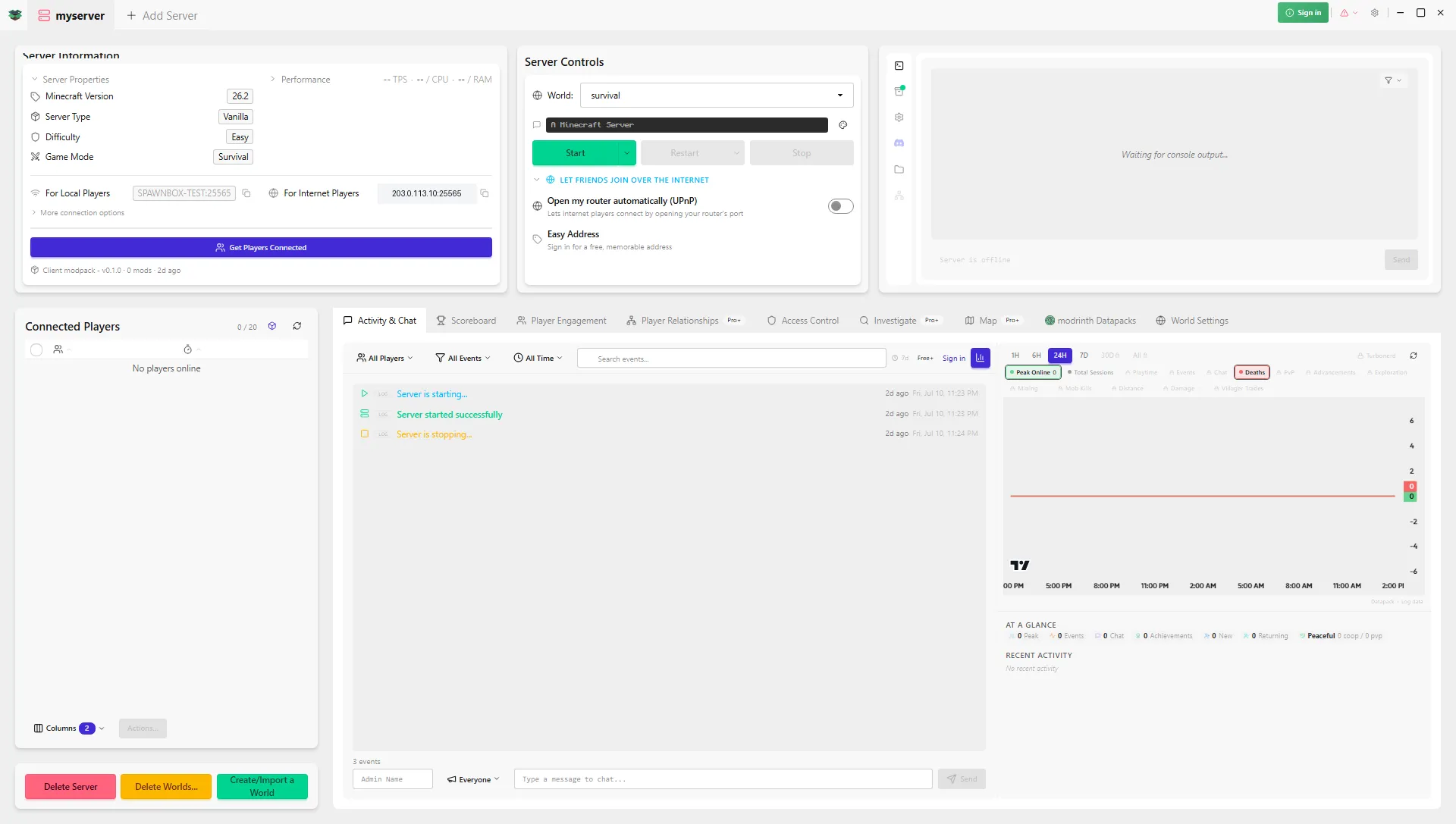
Minecraft server control panel: the simplest way to get one
Want a Minecraft server control panel like Pterodactyl or Crafty? The simplest way to get that same control skips the panel and Docker entirely. Here's how.
You want to run a Minecraft server without living in a command line, so you went looking for a control panel: a friendly dashboard to start and stop your server, change its settings, install mods, and keep an eye on your players. Here is the shortcut nobody mentions. The simplest way to get all of that is not to set up a panel at all. It is SpawnBox - that’s us - a free Windows app that hands you the dashboard without the sysadmin project underneath it. Let us look at what a panel really involves, and why we think an app gets you there faster.
What a server control panel actually is (and why people want one)
A server control panel is a web dashboard for running game servers. The popular ones for Minecraft are Pterodactyl, Crafty Controller, and AMP. Instead of typing commands, you click buttons: start and stop the server, edit config, watch the live console, manage players, install mods. The appeal is completely reasonable. Nobody actually wants to babysit a black command window.
The catch nobody mentions: you have to build the panel first
Here is the part the tutorials gloss over. A control panel does not run your server by itself; it is software you have to install and run first, and that setup is a project of its own. Depending on which one you pick, you are looking at installing the panel software, setting up Docker and a database, and often renting or running a Linux machine to host it all, then configuring the whole thing before you can launch a single Minecraft world. It is powerful, but it is a lot to stand up just to get a nice interface, and it is squarely aimed at people who are already comfortable on Linux.
SpawnBox: the control-panel experience, without the panel
We give you that same friendly control, start and stop, live console, settings, mods, players, but it arrives as a single Windows app you install like any other. There is no panel to set up, because SpawnBox is the interface.
Here is the honest part. Under the hood, we use the same kind of container technology the panels do; it is genuinely how modern servers run. The difference is that we install and manage all of that for you, the Linux piece, the containers, all of it, quietly in the background. You never install Docker, you never touch Linux, and you never open a command line. You click Install on the app, and a few minutes later you are running a server from a real interface.
What you get that a bare panel doesn’t
Because we went all in on Minecraft specifically, we do things a general-purpose panel does not:
- A one-click browser for mods, plugins, and datapacks (powered by Modrinth) where you pick what you want and it solves a compatible Minecraft version and loader for the whole set, plus a settings cog on each mod so you change its settings in a form, not a file.
- A live view of every player with more than two dozen real-time stats and animated 3D avatars, free.
- A memory advisor that warns you before you overcommit your PC’s memory, and automatic backups. On paid plans, automatic restarts if the server ever falls over.
- A friendly address to share so friends can join without you setting up port forwarding.
- And on Plus, a public web dashboard at your Easy Address that shows your server’s live status, who is online, and the scoreboard, so you can check in from any browser or share the link with your players.
For the full feature-by-feature look at how SpawnBox stacks up against the panels, see SpawnBox vs Minecraft server panels.
When a panel still makes sense
To be fair, panels exist for good reasons. If you are a hosting provider running dozens of servers for other people, or you specifically need a setup that many admins log into from a browser, a panel like Pterodactyl is built for exactly that, and it is very good at it. But if you are running your own server, for your family, your kids, or your friends, on a PC you already own, standing up a whole panel is a lot of machinery for the job. We are the simpler, and honestly more capable, path for that.
The short version
You do not need to install a panel, set up Docker, or rent a Linux box to get panel-grade control of your Minecraft server. We are the app that gives you that out of the box, with the technical setup hidden and the Minecraft-specific tools a general panel never had.
New to all of this? Our step-by-step Windows setup guide gets your first server running in minutes.